Living Image Visualizer
I’ve been chasing a simple feeling for a while now: the moment a still photograph stops being a picture and starts breathing. You’ve seen it — a neon skyline that shimmers, a portrait where the light seems to move, a piece of artwork that pulses in time with the track underneath it. So I built a tool that does exactly that, from a single image, and I’m calling it Living Image.
Drop in any HD still. Living Image studies it, wakes it up, and turns it into an endless, cinematic loop — with the glow and sparkle moving in time to your music. From there you can export a short seamless loop or a full video the exact length of your song, all the way up to eight hours.
What it actually does
When you load an image, the app looks at it first — it finds the brightest areas (a sunset, a window, a neon sign) and uses them as the natural light source, then tunes the glow to suit the picture. Nothing to set up; it just reads the photo and gets to work.
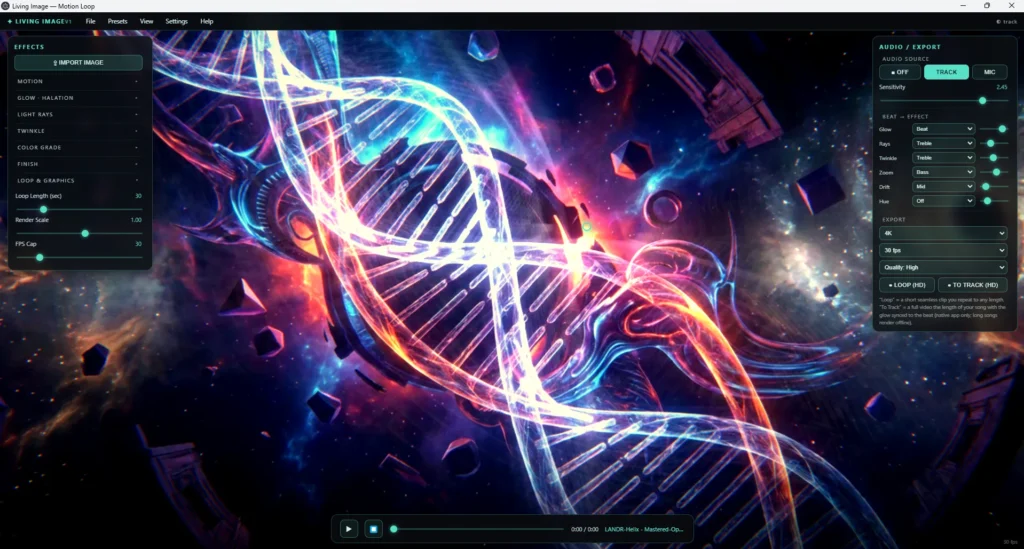
Then you shape it. Everything you’d reach for in a grading suite is here as a single slider:
- Halation & glow — light blooms and bleeds off the highlights, the way real lenses and old film do.
- Twinkle — the bright points shimmer and sparkle, perfect for city lights and stars.
- Motion — a slow breathing zoom, gentle parallax drift, and a heat-haze shimmer that keeps the frame alive without ever looking fake.
- Light rays — god-rays you aim by simply clicking where the light should come from.
- Full colour grade — hue, saturation, contrast, exposure, temperature, plus a cinematic finish of chromatic aberration, vignette and grain.
[IMAGE: screenshot of the Effects panel next to a glowing cityscape]
It moves to the music
This is the part I love. Every effect can be tied to your track. Pin the glow to the beat so the whole frame pulses on the kick. Send the twinkle to the treble so the lights dance on the hi-hats. Let the zoom ride the bass so the image breathes with the low end. You choose which effect follows bass, mids, treble or the beat — the same way you’d wire up a reactor graph in an editor, but live and in one window.
A photograph goes in. A performance comes out.
From one photo to an eight-hour video
There are two ways to get it out. Loop renders a short, perfectly seamless clip — no visible seam, so you can repeat it to any length you like. Render to Track bakes a full video the exact length of your song, with the beat-synced motion committed frame by frame and the audio already inside it. Great for a three-minute music video, or a full-length ambient piece running for hours.
Because the picture itself never gets re-invented — the effects simply ride on top of it — it stays crisp and clean the whole way through.
Who it’s for
If you make music and you want a visual that feels made for the song instead of slapped behind it, this is for you. It’s just as happy turning a piece of concept art into a looping backdrop for a stream, a photograph into a moody title card, or a single AI-generated cityscape into a living world for a long-form upload. One image, endless motion.
[EMBED: side-by-side — the still on the left, the living version on the right]
Built to be yours
Living Image runs right on your own machine as a desktop app — your images never leave it, and the exports are full-quality, straight to H.264. It’s part of a small family of visual tools I’ve been building under output.guru, each one aimed at the same thing: giving a piece of music something to look like.
More is coming — including true depth, so an image gains real dimension as it drifts. For now, I’m just enjoying watching photographs come alive. If you want to see what it does to your favourite image, stick around — I’ll be sharing pieces made with it soon.